by Rain Chu 2 月 24, 2023 | Windows , 熱門
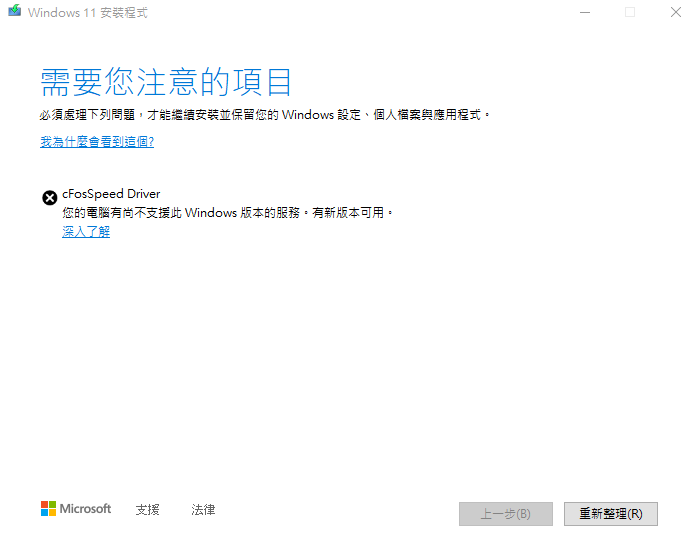
如果你在升級或是安裝Windows 11的時候,出現 cFosSpeed Driver 不支援的錯誤訊息的話,又跟我一樣是華碩的電腦,因為華碩的安裝程式會預設幫你安裝 Turbo LAN ,這套軟體是 ASUS 跟 cFosSpeed 取得授權並且提供給使用者用,但無奈的是會跟 Windows 11 起衝突,要解決問題的話,可以跟著我的步驟來解決這件事情。
cFosSpeed Driver 跟 windows 11 起衝突 1.先檢查你的網路連線 Network Connections
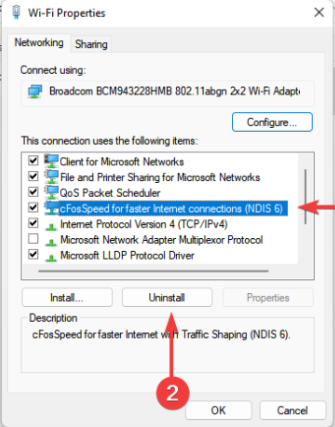
用 Win+R ,輸入 ncpa.cpl ,然後找到你正在使用的網路,並且移除 cFosSpeed 連線
移除 cFosSpeed 連線 2.開啟工作管理員移除開機就執行 cFosSpeed
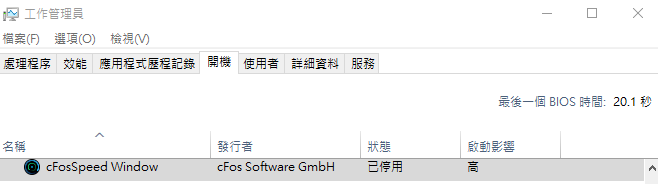
停用 cFosSpeed Window 服務 3.到應用程式與功能中移除 Turbo LAN
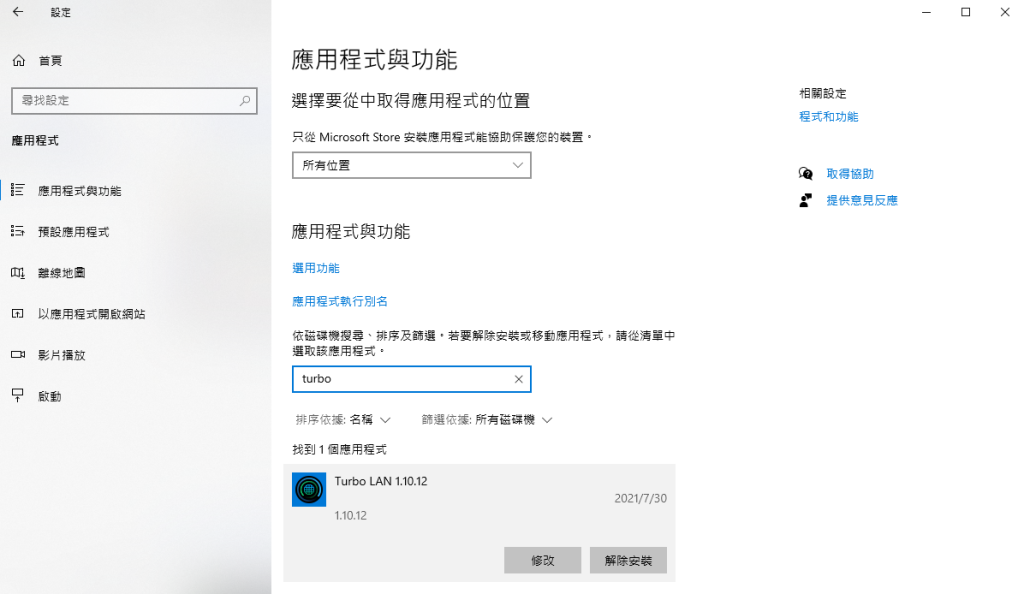
移除 Turbo LAN 程式 4.安裝最新版本的 cFos Speed
https://www.cfos.de/zh-tw/cfosspeed/cfosspeed.htm
5.利用新版本的 cFos Speed 的移除程式,解除安裝即可
參考資料
https://www.technewstoday.com/cfosspeed-driver-windows-11/
by Rain Chu 2 月 22, 2023 | 熱門 , 電信
辦了一個公司用的台灣之星門號,但公司有多個人需要排班且待命,所以就想到要用電話轉接功能,,查了一下台灣之星的服務設定說明,發現很完整也很好用,並且也支援無應答轉接功能,這樣以後我們就可以多人排班接電話了,在此紀錄一下。
參考台灣之星的服務設定網頁
https://www.tstartel.com/CWS/service_ssettings.php
電話轉接設定快速分享
無條件轉接 :將所有來話在手機未響之前,轉接至指定的號碼。
無應答轉接 :無人接聽電話時,將來電轉接至指定號碼。
取消以上個別指定轉接服務設定 :「##」+「服務代碼(21/61/62/67)」+「#」+「發送鍵」
無條件取消所有來電轉接 :「##」+「002」+「#」+「發送鍵」
注意事項:
當用戶設定「語音電話」的轉接功能時,「影像電話」則不受影響;反之亦然。
若您同時開啟話中插接及忙線轉接,則系統將依照話中插接功能運作。
https://softesim.com/
by Rain Chu 2 月 22, 2023 | Microsoft , SERVER , SQL
正常情況安裝完 MS SQL SERVER 後,防火牆都還需要手動打開,SQL SERVER要去開放網路連線協定,我這邊提供一次搞定的批次檔,只要下載到電腦中,並且用管理員權限執行就可以了,以下示範一下如何打開以及注意事項
示範用的環境
Windows server 2022
SQL Server 2022
SQL Server Configuration Manager的設定
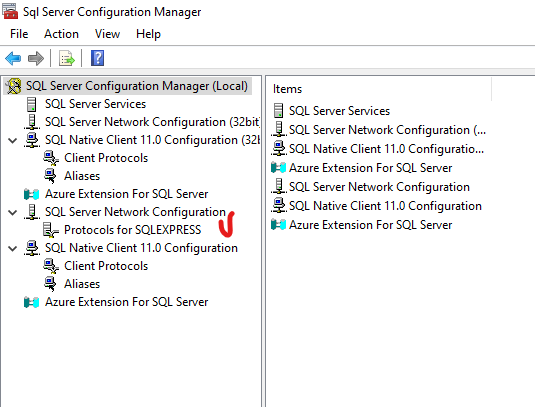
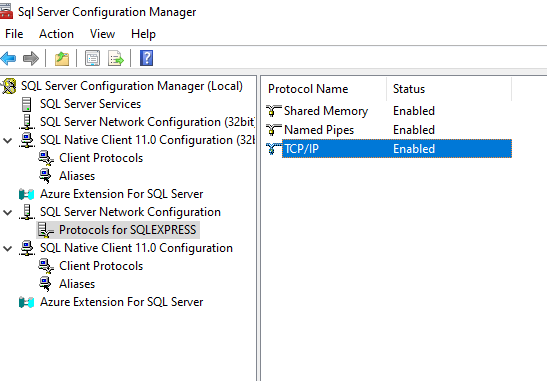
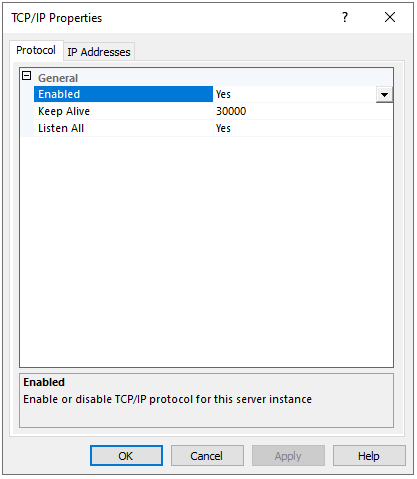
要先打開 SQL 的服務,所以先到 SQL Configuration Manager 中,把 TCP/IP 的協定打開
SQL Server Configuration Manager Network Protocols SQL Server Configuration Manager Network Protocols TCP/IP SQL Server Configuration Manager Network Protocols TCP/IP Enabled 防火牆設定
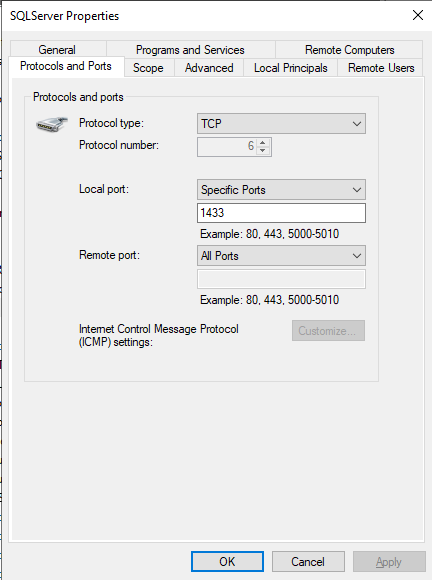
MS SQL SERVER 預設的 PORT 是 1433,打開這一個就可以正常連線
使用 Script 將所有的防火牆設定一次搞定
@echo =========  SQL Server Ports  ===================
@echo Enabling SQLServer default instance port 1433
netsh firewall set portopening TCP 1433 "SQLServer"
@echo Enabling Dedicated Admin Connection port 1434
netsh firewall set portopening TCP 1434 "SQL Admin Connection"
@echo Enabling conventional SQL Server Service Broker port 4022
netsh firewall set portopening TCP 4022 "SQL Service Broker"
@echo Enabling Transact-SQL Debugger/RPC port 135
netsh firewall set portopening TCP 135 "SQL Debugger/RPC"
@echo =========  Analysis Services Ports  ==============
@echo Enabling SSAS Default Instance port 2383
netsh firewall set portopening TCP 2383 "Analysis Services"
@echo Enabling SQL Server Browser Service port 2382
netsh firewall set portopening TCP 2382 "SQL Browser"
@echo =========  Misc Applications  ==============
@echo Enabling HTTP port 80
netsh firewall set portopening TCP 80 "HTTP"
@echo Enabling SSL port 443
netsh firewall set portopening TCP 443 "SSL"
@echo Enabling port for SQL Server Browser Service's 'Browse' Button
netsh firewall set portopening UDP 1434 "SQL Browser"
@echo Allowing multicast broadcast response on UDP (Browser Service Enumerations OK)
netsh firewall set multicastbroadcastresponse ENABLE
下載已經寫好的bat檔案
參考資料
http://support.microsoft.com/kb/968872/zh-tw
by Rain Chu 2 月 20, 2023 | woocommerce , wordpress
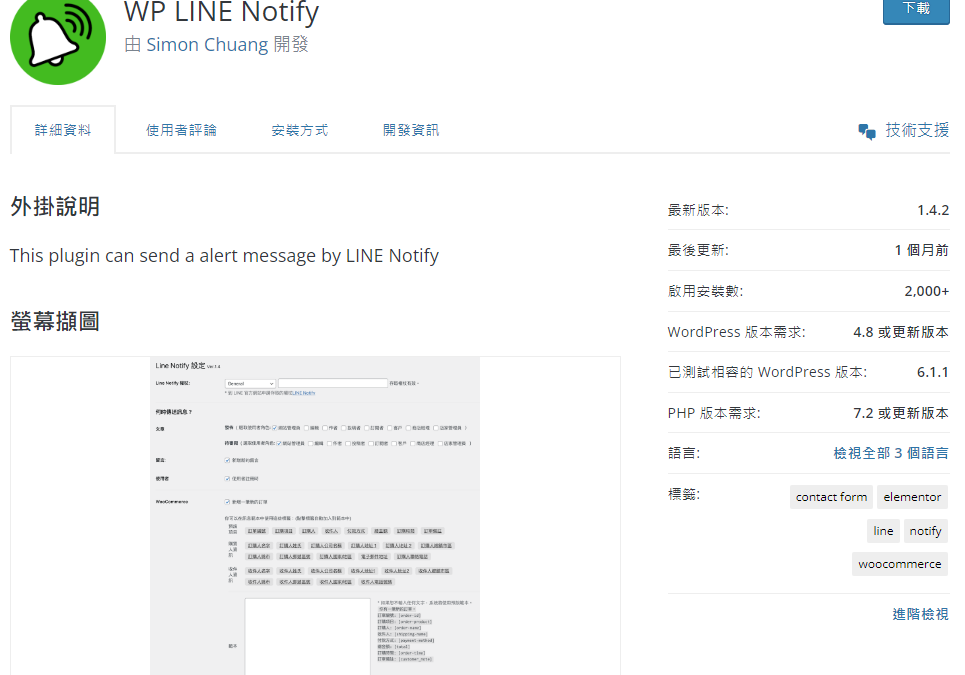
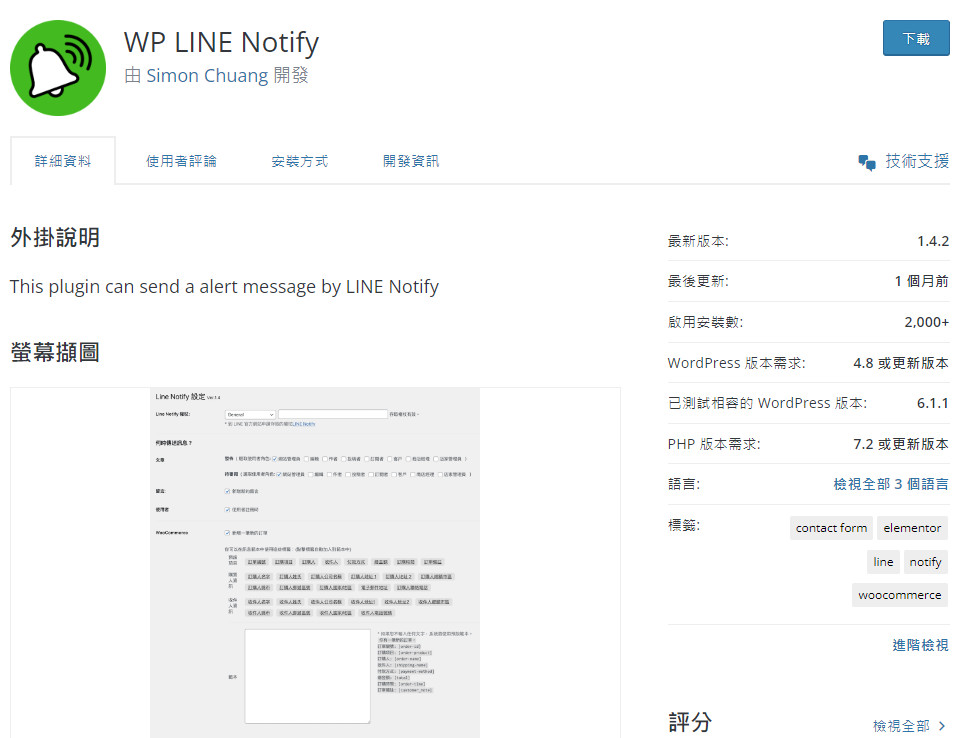
這次想要推薦大家用 WP LINE Notify ,在台灣、泰國、日本多數人都有LINE,並且在LINE上檢查訊息的時間遠遠大於檢查EMAIL,所以我們再用 WordPress 以及 WooCommerce 的時候,對於留言、評論、訂單通知,想要透過 LINE 來知道的話,可以使用 WP LINE Notify 外掛。
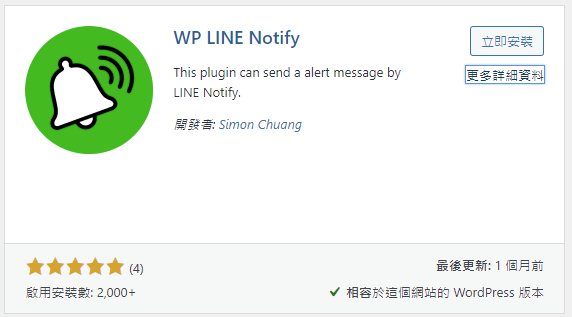
第一步,先安裝 WP LINE Notify
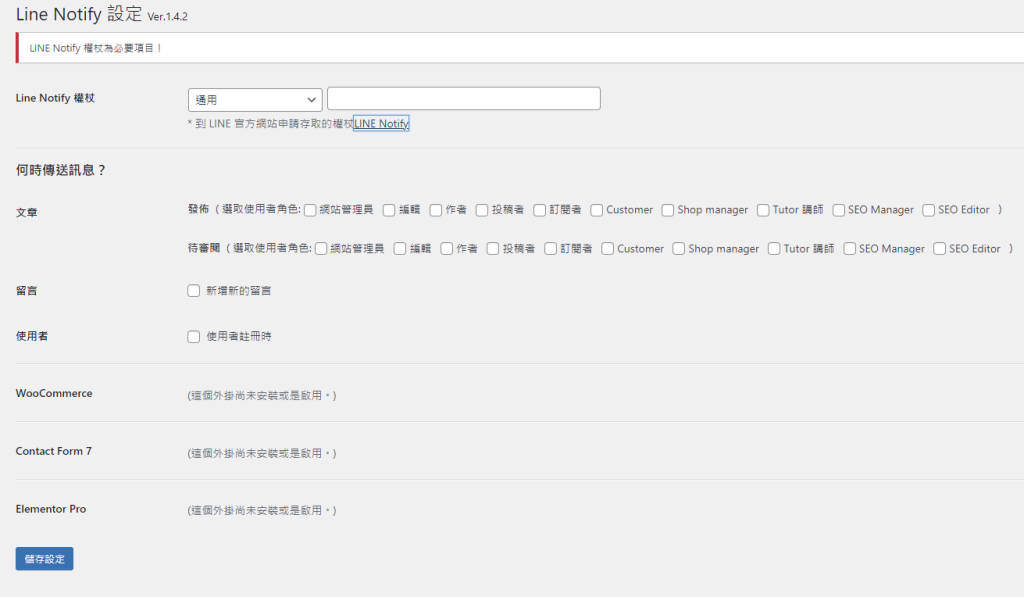
第二步,啟用 WP LINE Notify 並且設定
這一步驟需要先申請 LINE Notify ,https://notify-bot.line.me/my/ ,申請完畢後,把 token 抄起來,並且複製到 LINE Notify 權杖的欄位中,之後就可以使用了
參考資料
LINE Notify 官網
by Rain Chu 2 月 18, 2023 | woocommerce , wordpress
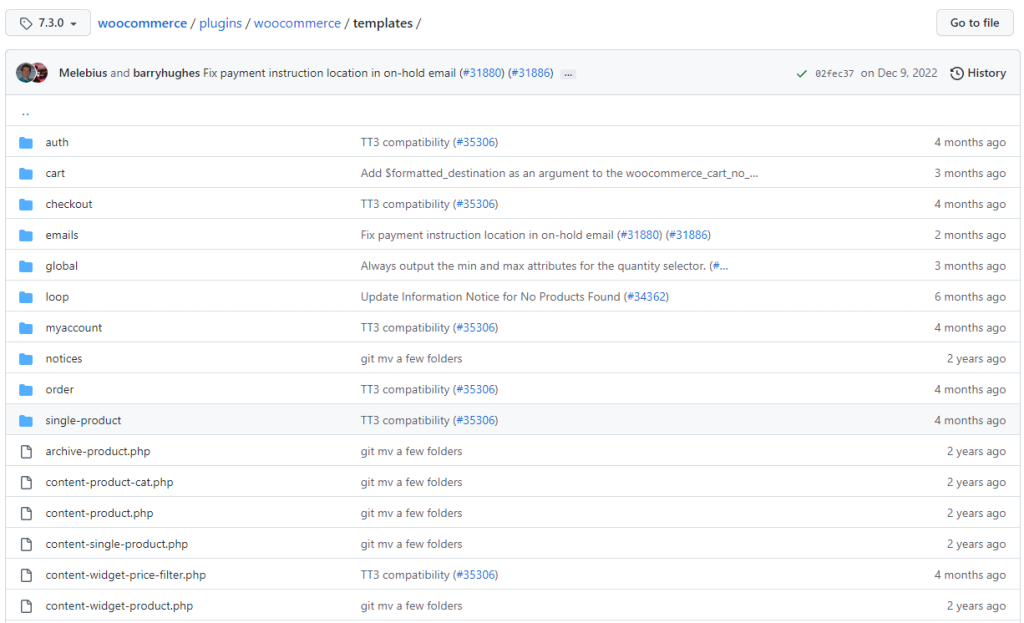
先來看一下 woocommerce 的樣板目錄結構(template structure)
位置在 /woocommerce/templates/ 我手上的是7.3版本,預設資料有
當你需要在自己的佈景主題 Theme 使用模板時候,只需要把它複製到你的佈景主題下,並且跟著下面的規範就可以了
將templates的字樣拿掉即可
例如:
content/plugins/woocommerce/templates/emails/admin-new-order.php
wp-content/themes/yourtheme/woocommerce/emails/admin-new-order.php
參考資料

近期留言