by Rain Chu 4 月 15, 2022 | NFT , Polygon , 區塊鏈
戈壁挑戰賽-玄奘之路-第四屆-交流 最近最多人使用的 NFT 平台 OpenSea 也開始支援了 Polygon 鏈,並且發行 NFT 並不用任何的費用,之後有賣出並且成交的交易手續費收取 2.5% 也是相當合理,我想可以大量的使用他來上鏈了,剛好也有疑惑,鏈上的 NFT 一定是需要正正方方的嗎?我手上的3D圖、環景圖可不可以使用,經過測試以及驗證發現都是可以用的,說明如下:
1.建立新的 NFT
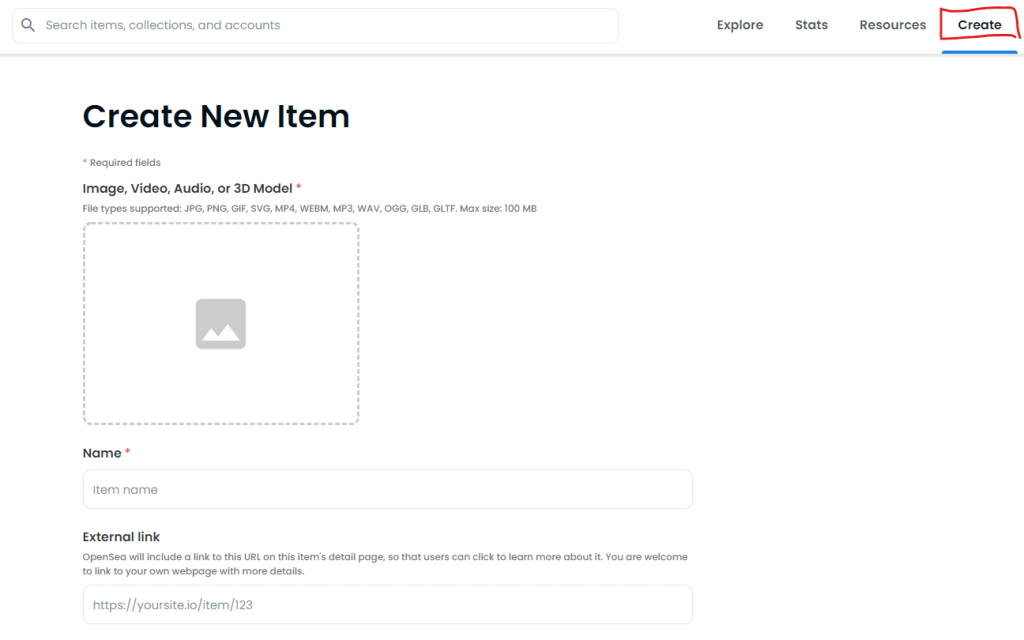
進入 OpenSea 並且選擇 Create (建立) 2.上傳圖片以及填寫相關資訊
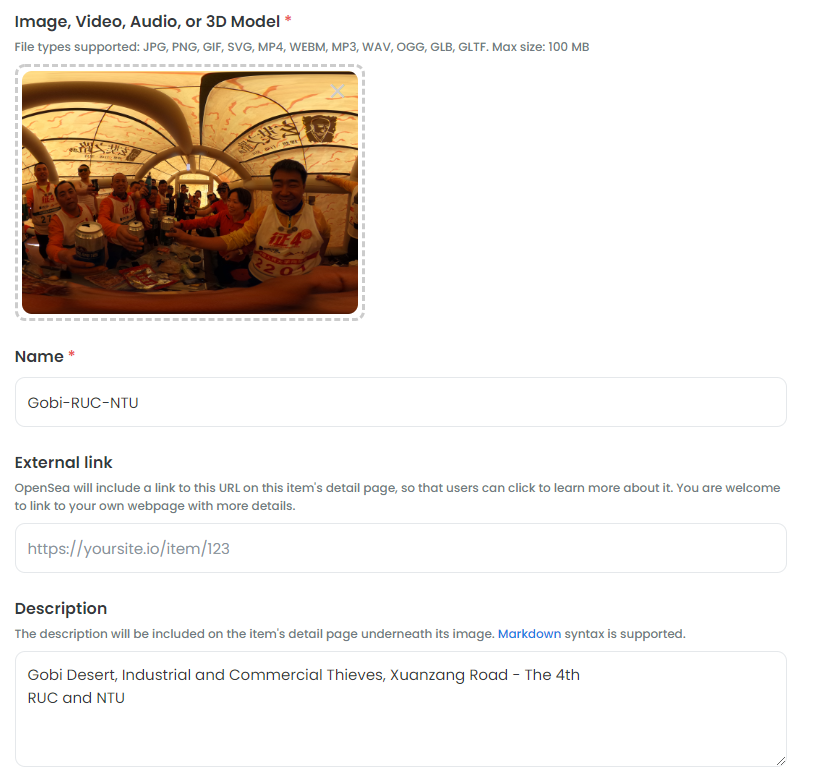
必要資訊有
Image, Video, Audio, or 3D Model (圖片、影片、聲音、3D模型檔) Name 名稱 Blockchain 區塊鏈 OpenSea 上架 NFT 相關資訊 3.選擇區塊鏈
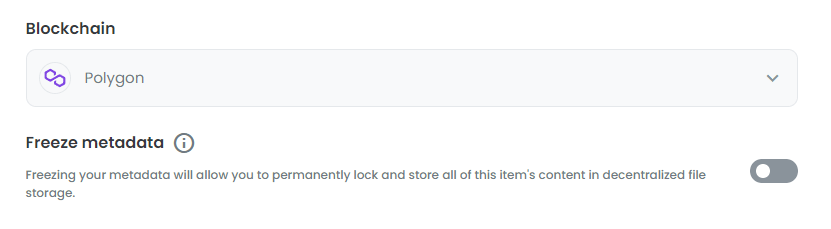
區塊鏈預設是以太坊 記得可以改成 Polygon 鏈 4. NFT 建立完成
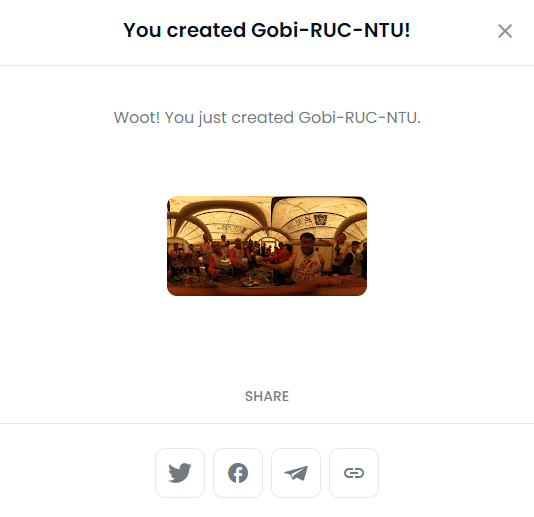
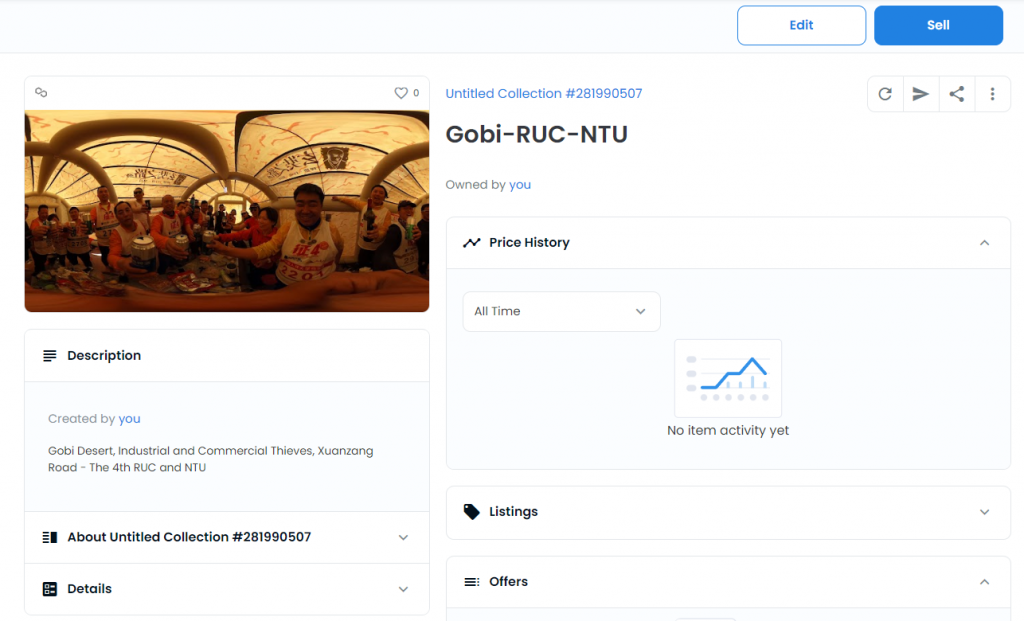
建立 NFT 完成後就可以分享以及蒐藏到你的 MetaMask 錢包中了 5.販賣 NFT
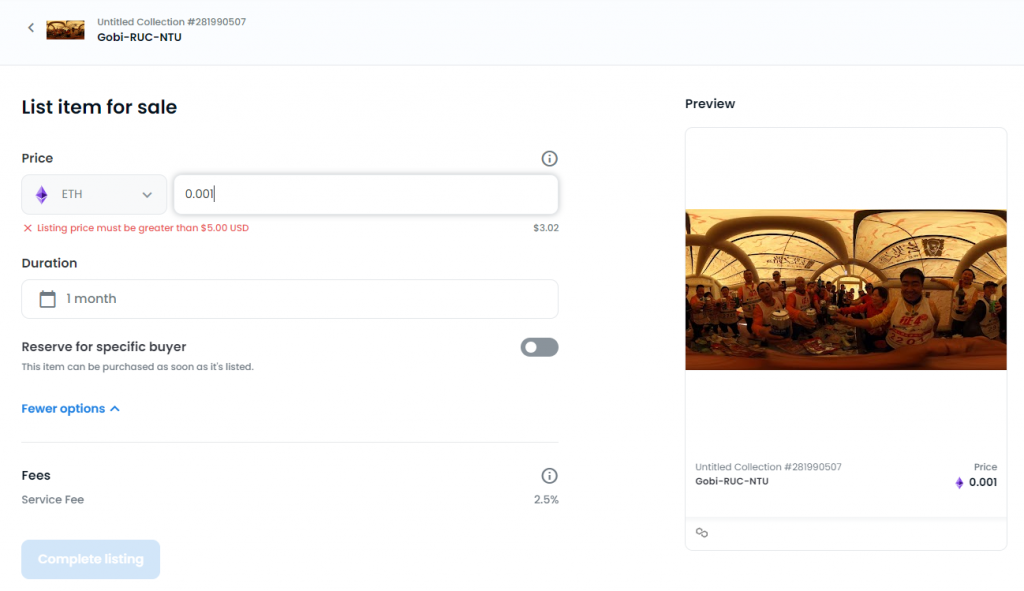
選擇 Sell 鈕可以開始為你的 NFT 定價格 OpenSea 中的 NFT 最低定價是 5 美元,換算台幣和 ETH 的話,建議最低由 0.002 ETH 開始,當然沒有人可以阻擋你設定高價 6.將 NFT 收藏放到 MetaMask 小狐狸上
在 OpenSea 中查看你的資產,例如我這個 NFT 的連結,https://opensea.io/assets/matic/0x2953399124f0cbb46d2cbacd8a89cf0599974963/4569312194679960174525000099739852468515614363778901331080870246133440446465/
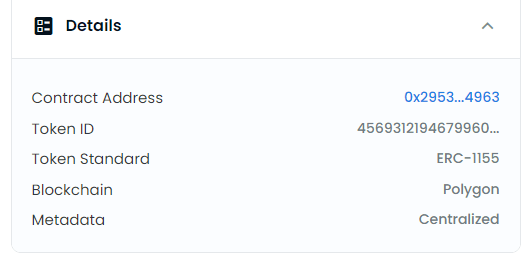
找到 Details 資訊
將 Contract Address 以及 Token ID 複製出來
Contract Address : 0x2953399124f0cbb46d2cbacd8a89cf0599974963
Token ID : 4569312194679960174525000099739852468515614363778901331080870246133440446465
並且把這兩個資訊輸入回你的 MetaMask 小狐狸錢包中即可看到你自己得收藏品了,記得狐狸錢包中要把鏈改成 Polygon
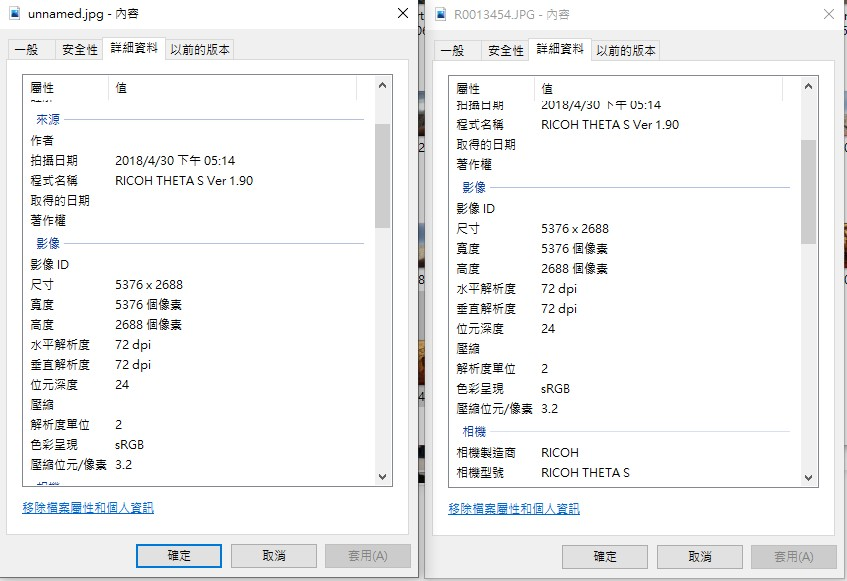
下載圖片以及上傳圖片比較
左邊是由 OpenSea 下載下來的圖檔,右邊是我上傳上去的原始圖檔 連結
OpenSea NFT Gobi-RUC-NTU
NFT Gobi-RUC-NTU 圖片下載
合約位置:https://polygonscan.com/address/0x2953399124f0cbb46d2cbacd8a89cf0599974963
Token ID : 4569312194679960174525000099739852468515614363778901331080870246133440446465
by Rain Chu 4 月 5, 2022 | Binance
經過嘗試後,我想分別介紹大家三種在幣安智能鏈鏈發幣的方法,分別是手動在 Remix 上撰寫智能合約,利用 CoinTool V2 (V1已經不支援了)發一個可以分潤給別人的代幣(Token)以及最簡單的老牌 TokenDIY 一鍵發幣,只要填寫三個重要參數即可發幣完成。
TokenDIY 一鍵發幣
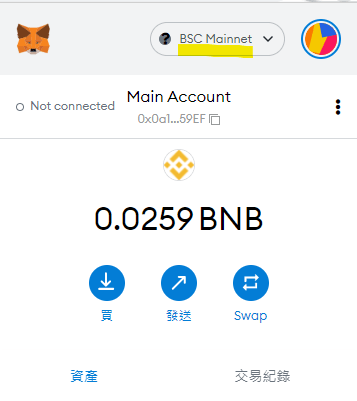
先進入網頁後並且用 MetaMask 連結 TokenDIY,並且選擇到正確的鏈上,本例是幣安鏈
提供 MetaMask 連結幣安鏈的參數
Network Name/網絡名稱: BSC Mainnet New RPC URL/節點網址:https://bsc-dataseed.binance.org Chain ID/鏈標識:0x38 Symbol/貨幣符號:BNB Block Explorer URL/區塊瀏覽器網址:https://bsscan.com/ 連結完成就可以依序填入參數
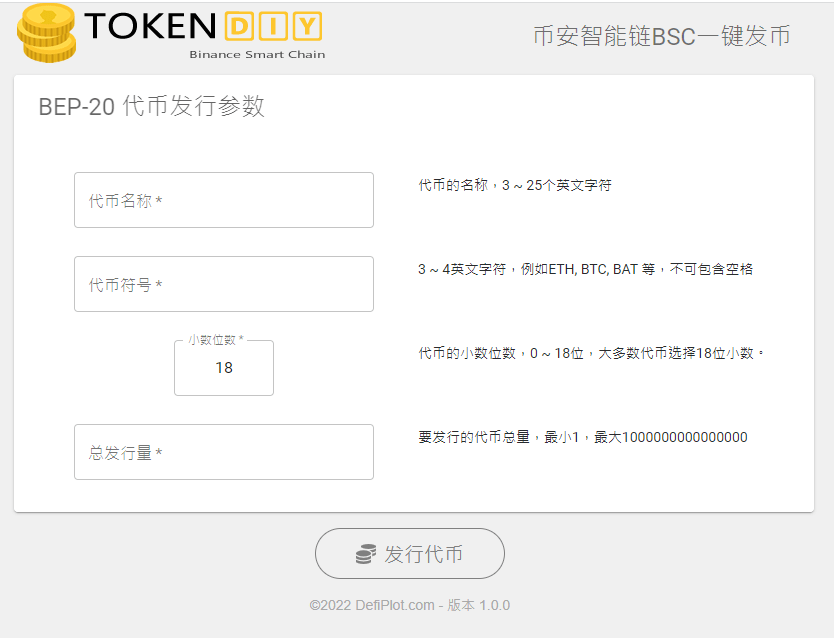
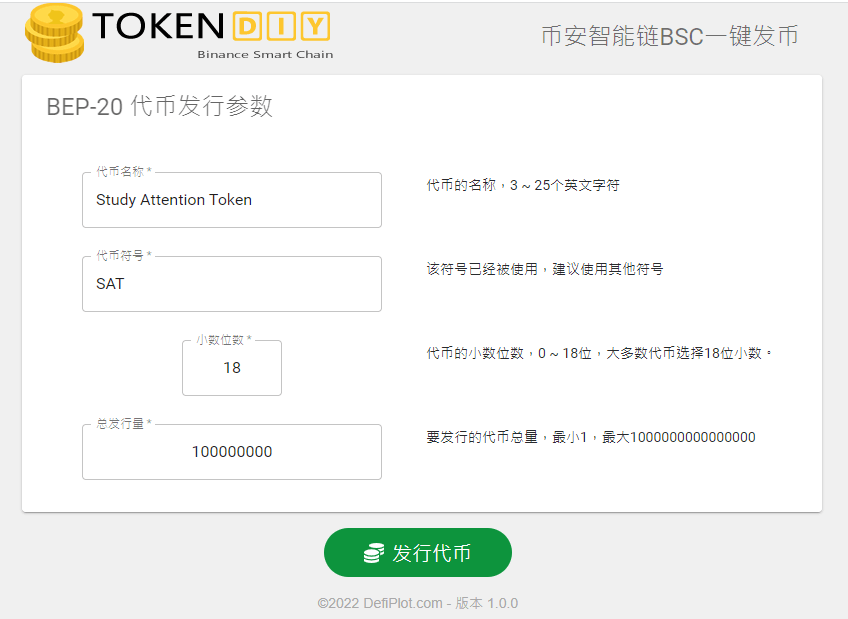
http://bsc.tokendiy.defiplot.com/#/ 一鍵發幣共有四個參數,但小數位數建議用預設的18位數,可以去掉一個,其他的就只要填寫代幣名稱,代幣符號、和發行量即可,可以試試看我的範本。
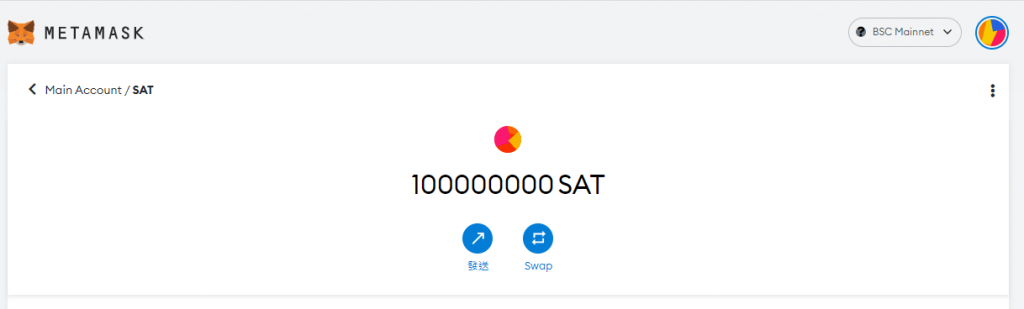
代幣名稱 : Study Attention Token (學習專注幣) 代幣符號 : SAT (簡稱) 小數位數 : 18 (預設) 總發行量 : 100000000 (1後面8個0唯一億枚)
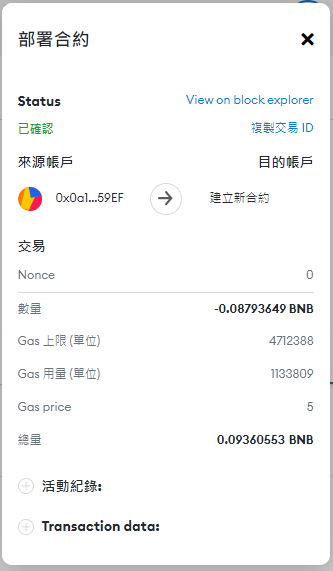
BSC發行手續費用
本次是 0.09360553 BNB,當天匯率是 $455.05 BUSD/BNB,換算下來是 $1,150元台幣,供參考
發行完畢後,會將發行的代幣放到你連結的帳戶中,就可以有1億枚代幣進行你的商模
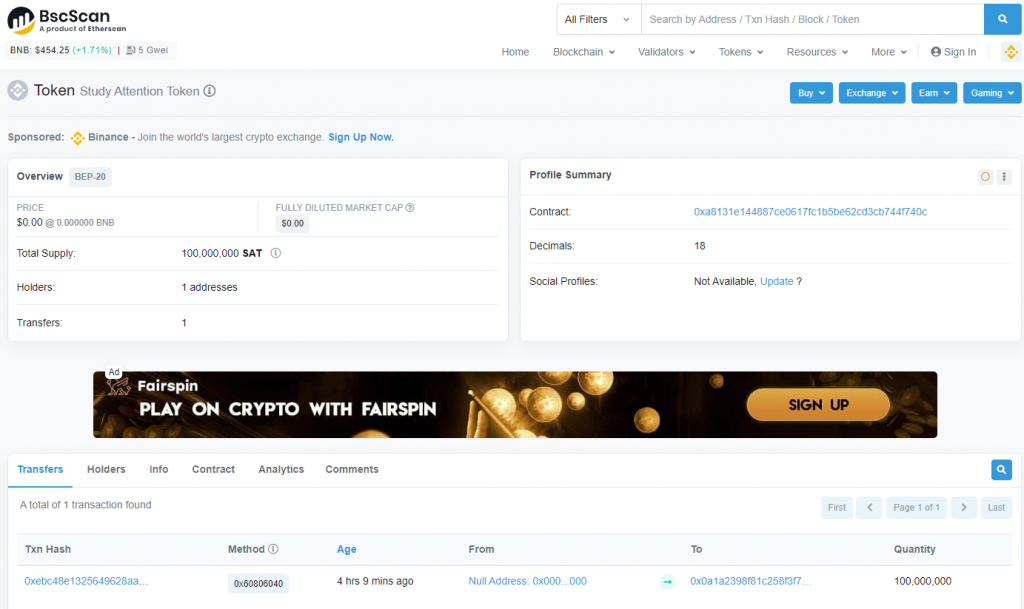
已本發行的 SAT 幣為例,在發行完成後可以將網路複製下來,並且到 BSC SCAN 中去查詢,可以看到發行了1億枚,放到一個位置去,接下來的步驟要去 SWAP 創造一個你想要瞄定的價位,舉例來說是1美元或是1新台幣,然後就可以進行空投了。
https://bscscan.com/token/0xa8131e144887ce0617fc1b5be62cd3cb744f740c
TokenTool 其實也算是一鍵發幣,動作跟上面一樣,只是多了參數可以使用
VIDEO
本次採用的是全能分紅代幣,程式碼蠻新的,功能也很多,具有參考價值
VIDEO
RedKing.sol智能合約位置
https://github.com/misu2022/contracts
編譯器為 v0.8.7+commit.e28d00a7.js
部署參數
name_: RedKing Token (代币名称)
symbol_: RedKing (代币符号)
totalSupply_: 1000000000000000 (发行量)
rewardAddr_: 要分红的代币合约,BSC常用代币地址在下方
marketingWalletAddr_: 自己的市场营销钱包
serviceAddr_: 0xFe4192C1f01b26b33D89feAA9551bcF6B3637CB4
buyFeeSetting_: [4,3,2,1] (分红、流动性、市场营销、燃烧)
sellFeeSetting_: [5,4,3,2] (分红、流动性、市场营销、燃烧)
tokenBalanceForReward_: 1000000000000000000000000000 (持有多少代币参与分红。数量后要加18个0)
參考資料
https://min.news/zh-tw/tech/b4369e93850404697c6fbbc54284fdfd.html
另外一個一鍵發幣的網站服務 TokenBB
TokenTool 可以學習創建分潤代幣的地方
CoinTool 合約安全檢查
延伸閱讀
by Rain Chu 3 月 25, 2022 | woocommerce , wordpress
網路上有很多解決在 woocommerce 的分類目錄中,隱藏無庫存商品的方法,但都不合我用,只好自己動手寫一個適合的,設計的思維是,在取得商品的之前 (pre_get_posts) ,我們判斷商品是否已經無庫存,是的話,我們就把發布狀態設定為私密 (private),型錄可見度設定為「隱藏」
在 functions.php 中加入以下的程式碼
// 在目錄中隱藏無庫存的商品
add_action( 'pre_get_posts', 'custom_pre_get_posts_query' );
function custom_pre_get_posts_query( $q ) {
if ( ! $q->is_main_query() ) return;
if ( ! $q->is_post_type_archive() ) return;
if ( ! is_admin() ) {

$q->set( 'tax_query', array(array(
'taxonomy' => 'product_cat',
'field' => 'slug',
'terms' => array( 'sb00001' ), // 設定在那幾個目錄中要處理,多個目錄的話用逗號分隔
'operator' => 'NOT IN',
'post_status' => 'private',
)));
}
remove_action( 'pre_get_posts', 'custom_pre_get_posts_query' );
}
2022-03-28 更新
上面的寫法不一定成功,補充另一個寫法,只要在商品庫存量被變更的時候,去將商品的顯示狀態設定成隱藏起來就可以了
add_action( 'pre_get_posts', 'custom_pre_get_posts_query' );
function custom_pre_get_posts_query( $q ) {
if ( ! $q->is_main_query() ) return;
if ( ! $q->is_post_type_archive() ) return;
if ( ! is_admin() ) {

global $wpdb;
$results = $wpdb->get_results(
'SELECT * FROM `wp_aws_index` c WHERE c.id in (SELECT a.ID FROM `wp_posts` a
join `wp_postmeta` b ON a.ID = b.post_id
where b.meta_key = "_stock_status" and b.meta_value = "outofstock");

UPDATE `wp_aws_index` c SET c.visibility = "hidden" WHERE c.id in
(SELECT a.ID FROM `wp_posts` a join `wp_postmeta` b ON a.ID = b.post_id where b.meta_key = "_stock_status" and b.meta_value = "outofstock");

DELETE FROM `wp_aws_cache`;
delete from `wp_term_relationships` WHERE `term_taxonomy_id` = 7 AND `object_id` in (SELECT a.ID FROM `wp_posts` a join `wp_postmeta` b ON a.ID = b.post_id where b.meta_key = "_stock_status" and b.meta_value = "outofstock");
INSERT INTO `wp_term_relationships` (`object_id`, `term_taxonomy_id`) VALUES ((SELECT a.ID FROM `wp_posts` a join `wp_postmeta` b ON a.ID = b.post_id where b.meta_key = "_stock_status" and b.meta_value = "outofstock"), 7);'
, OBJECT);

remove_action( 'pre_get_posts', 'custom_pre_get_posts_query' );
}
by Rain Chu 3 月 23, 2022 | wordpress
預約系統在各行各業中都會用到,預約醫生、老師時間,預約健身房時間,預約會議室時間,每種需要都不一樣,也很複雜,這邊先推薦一個可以用在預約專業人員時間的預約系統,使用起來,對於他的設定介面我覺得是預約系統中設計得最好的,80%的功能都可以直接使用。
BookingPress 最喜歡的功能如下
設定介面簡潔好用 使用者前端界面好看清楚 可以快速自訂顯示文字,包含中文化 使用者端有精靈,可以協助預定時間 可以預約加上線上付款 預約時間後,可以由後台再去確認 時間可以切分到分鐘 使用 BookingPress 提供預約服務
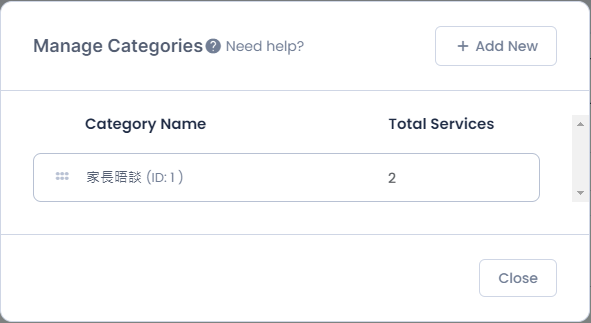
1.先建立一個分類目錄 Categories
建立分類目錄的目的是用來放服務 Service
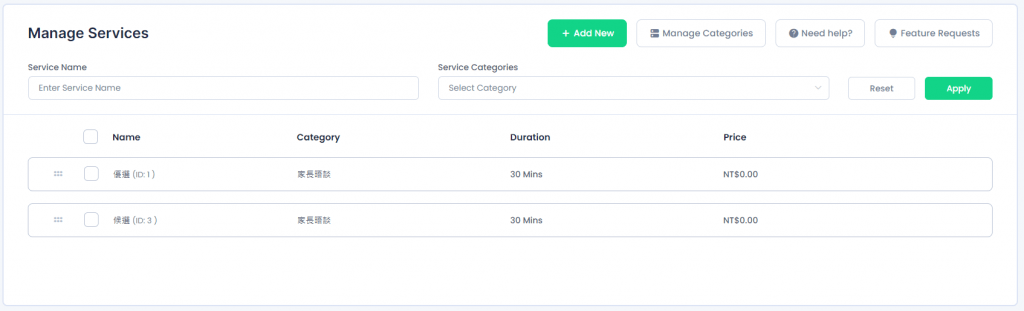
2.建立服務
在剛剛建立的分類下,新增服務,服務可以是某一位醫生、老師
3.新增頁面,用來放置預約表單
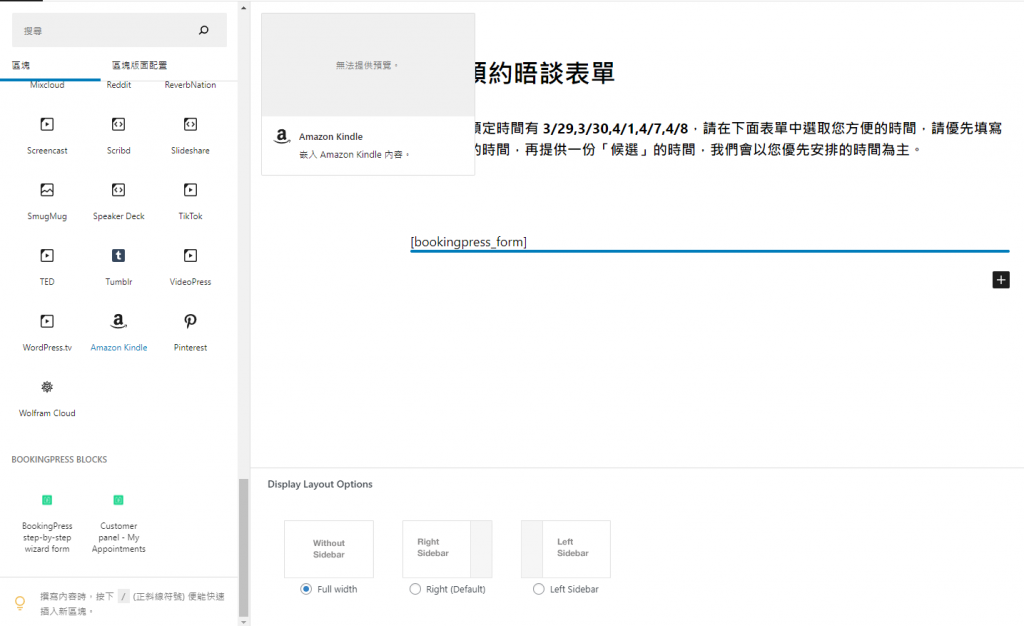
在頁面中,新增一個區塊並且插入 [bookingpress_form] ,這個區塊未來會是一個精靈,引導使用者去預約
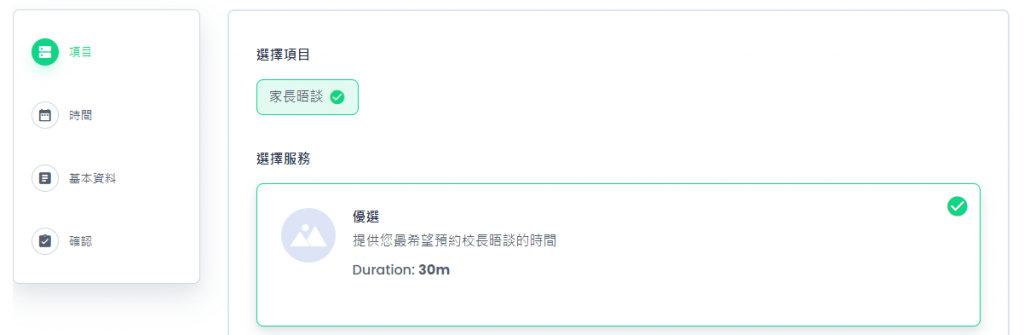
前端的頁面呈現的樣子 4.設定頁面呈現資料的細節
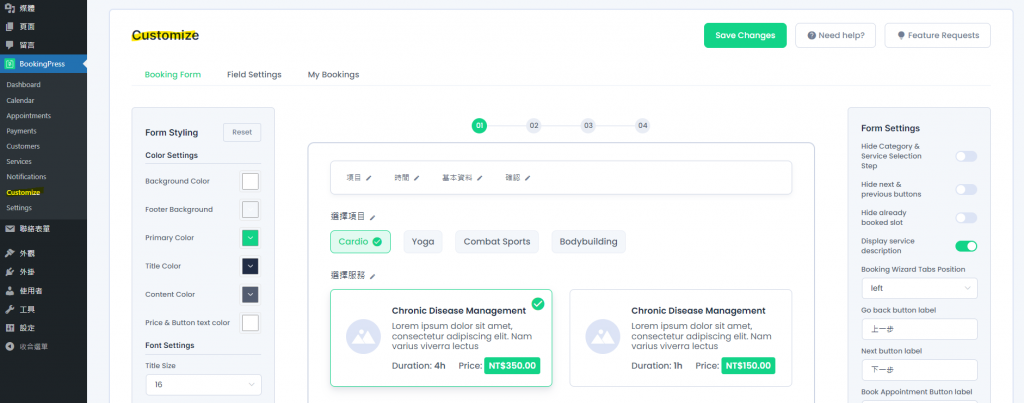
接下來主要去 bookingpress -> customize 中修改顯示的資訊,這邊可以更改成中文,和需要顯示的資訊
5.設定功能細節
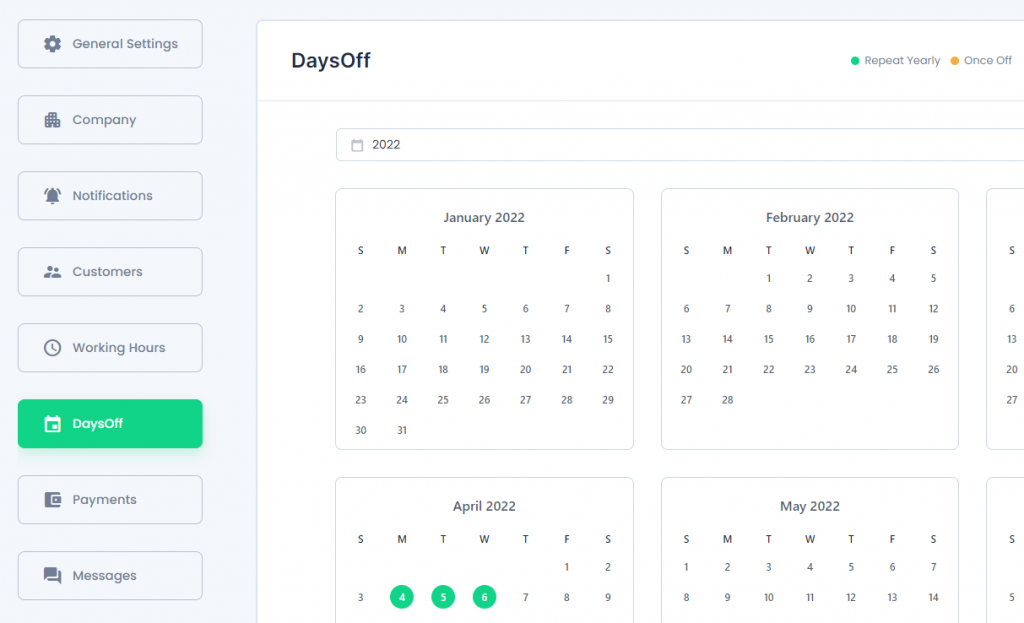
在 bookingpress -> setting 中,每一個選項都還蠻重要的,都要進去做些微調,其中 DaysOff 比較難懂一點,一般的預約系統是正向表列,bookingpress 則是負向表列,在這個表中,有選擇的,就會是假日檔,也就是那天就不開放預約,,其他的時間會去跟你的工作時間中比對後在前端顯示給使用者,並且這個設定是全域的,沒法針對單一的服務
延伸閱讀以及下載
bookingpress 官網 https://www.bookingpressplugin.com/
bookingpress plug 下載 https://tw.wordpress.org/plugins/bookingpress-appointment-booking/
by Rain Chu 3 月 22, 2022 | PHP , woocommerce , wordpress
點選商品圖片後的行為網址
客戶常常是想要快速結帳,所以通常希望在商品頁面中,點選圖片就可以直接進入結帳了,這時候在 wordpress woocommerce 中沒有特別好用的 Pugin 可以利用,我的解法是在佈景主題中的 functions.php ,加入下面的程式碼片段,其中add-to-cart=id , id 指的是商品 id , quantity=1,1 是數量。
點選圖片後,會直接到結帳頁面,/checkout/?add-to-cart=’.$product->get_id().’quantity=1 點選圖片後,會直接到購物車,/cart/?add-to-cart=’.$product->get_id().’&quantity=1 /?add-to-cart=’.$product->get_id() functions.php
// woocommerce
// 設定圖片上的商品連結
if ( ! function_exists( 'woocommerce_template_loop_product_link_open' ) ) {
	/**
	 * Insert the opening anchor tag for products in the loop.
	 */
	function woocommerce_template_loop_product_link_open() {
		global $product;

        //原先的設定
		//$link = apply_filters( 'woocommerce_loop_product_link', get_the_permalink(), $product );

      	// 1.改成直接到結帳頁面中
        $link = '/checkout/?add-to-cart='.$product->get_id().'&quantity=1';

      	// 2.點選圖片直接會到購物車中
      	$link = '/cart/?add-to-cart='.$product->get_id().'&quantity=1';

      	// 3.點選圖片後不跳轉,但會加入到購物車中
      	$link = '/?add-to-cart='.$product->get_id();

		echo '<a href="' . esc_url( $link ) . '" class="woocommerce-LoopProduct-link woocommerce-loop-product__link">';
	}
}
搜尋商品後,點選產品清單中的圖片直接進入購物車
/wp-content/themes/themename/template-tags.php
修改$permalink = !empty( $args[‘permalink’] ) ? $args[‘permalink’] : ‘/checkout/?add-to-cart=’.$post_id.’quantity=1′;
function et_extra_get_post_thumb( $args = array() ) {
	$default_args = array(
		'post_id'                    => 0,
		'size'                       => '',
		'height'                     => 50,
		'width'                      => 50,
		'title'                      => '',
		'link_wrapped'               => true,
		'permalink'                  => '',
		'a_class'                    => array(),
		'img_class'                  => array(),
		'img_style'                  => '',
		'img_after'                  => '', // Note: this value is not escaped/sanitized, and should be used for internal purposes only, not any user input
		'post_format_thumb_fallback' => false,
		'fallback'                   => '',
		'thumb_src'                  => '',
		'return'                     => 'img',
	);

	$args = wp_parse_args( $args, $default_args );

	$post_id = $args['post_id'] ? $args['post_id'] : get_the_ID();

	// add to cart link
	//$permalink = !empty( $args['permalink'] ) ? $args['permalink'] : get_the_permalink( $post_id );
	$permalink = !empty( $args['permalink'] ) ? $args['permalink'] : '/checkout/?add-to-cart='.$post_id.'quantity=1';

	$title = !empty( $args['title'] ) ? $args['title'] : get_the_title( $post_id );

	$width = (int) apply_filters( 'et_extra_post_thumbnail_width', $args['width'] );
	$height = (int) apply_filters( 'et_extra_post_thumbnail_height', $args['height'] );
	$size = !empty( $args['size'] ) ? $args['size'] : array( $width, $height );
	$thumb_src = $args['thumb_src'];
	$img_style = $args['img_style'];

	$thumbnail_id = get_post_thumbnail_id( $post_id );

	if ( !$thumbnail_id && !$args['thumb_src'] ) {
		if ( $args['post_format_thumb_fallback'] ) {
			$post_format = et_get_post_format();
			if ( in_array( $post_format, array( 'video', 'quote', 'link', 'audio', 'map', 'text' ) ) ) {
				$thumb_src = et_get_post_format_thumb( $post_format, 'thumb' );
			} else {
				$thumb_src = et_get_post_format_thumb( 'text', 'thumb' );
			}
		} else if ( !empty( $args['fallback'] ) ) {
			return $args['fallback'];
		} else {
			$thumb_src = et_get_post_format_thumb( 'text', 'icon' );
		}
	}

	if ( $thumbnail_id ) {
		list($thumb_src, $thumb_width, $thumb_height) = wp_get_attachment_image_src( $thumbnail_id, $size );
	}

	if ( 'thumb_src' === $args['return'] ) {
		return $thumb_src;
	}

	$image_output = sprintf(
		'<img src="%1$s" alt="%2$s"%3$s %4$s/>%5$s',
		esc_attr( $thumb_src ),
		esc_attr( $title ),
		( !empty( $args['img_class'] ) ? sprintf( ' class="%s"', esc_attr( implode( ' ', $args['img_class'] ) ) ) : '' ),
		( !empty( $img_style ) ? sprintf( ' style="%s"', esc_attr( $img_style ) ) : '' ),
		$args['img_after']
	);

	if ( $args['link_wrapped'] ) {
		$image_output = sprintf(
			'<a href="%1$s" title="%2$s"%3$s%5$s>
				%4$s
			</a>',
			esc_attr( $permalink ),
			esc_attr( $title ),
			( !empty( $args['a_class'] ) ? sprintf( ' class="%s"', esc_attr( implode( ' ', $args['a_class'] ) ) ) : '' ),
			$image_output,
			( !empty( $img_style ) ? sprintf( ' style="%s"', esc_attr( $img_style ) ) : '' )
		);
	}

	return $image_output;
}




近期留言